
What if we said you could turn mundane PDFs into immersive videos?
Sure thing, HR and L&D teams would be elated!
Most HR and L&D teams share the same moment of dread. You’ve finished stitching together a new onboarding pack.
It includes a 60-page PDF with policies, an internal slide deck, a patchwork of SOPs, a process document someone wrote at 2 AM, and links scattered across Notion.
Leadership says the new hires won’t read it. Let’s face it, anyone would think the same.
Someone suggests, “We should turn all of this into a video.” It sounds smart until everyone realizes what that actually requires: writing a script, recording narration, editing footage, exporting, revising, updating it again next month when something changes, and maintaining a growing library of training assets video by video.
That’s where the conversation shifts to tools. Teams already familiar with Descript think, “Maybe we can use it to convert our onboarding content.” Meanwhile, newer AI-driven platforms like Docustream promise to generate training videos and interactive explainers directly from the documents without recordings, editing, or timelines. If you’re searching for “Docustream vs Descript” you’re really asking a deeper operational question:
Do we want an AI video editor that works on footage, or an AI engine that turns our documents into self-explaining training experiences?
This comparison is written for the people carrying the operational burden of training and onboarding:
- HR leaders responsible for consistent, compliant onboarding
- L&D and enablement managers who need scalable content, not a pile of editing tasks
- Customer Success and Support leaders who want clients trained without endless calls
- RevOps and Ops leaders who own SOPs, process docs, and internal playbooks
- Training-heavy B2B teams drowning in PDFs and static documentation
Most importantly, it’s for teams who’ve recognized that manually creating and maintaining training videos is unsustainable. You don’t need a video editor. You need your documents to do more work on their own.
If your content starts as PDFs, SOPs, handbooks, or policies and you want interactive training without touching a timeline editor, Docustream is the right choice. If you are editing footage or audio and care about precise control, Descript is the better fit.
Docustream vs Descript: Quick Comparison Overview
| Docustream: | Descript: |
|---|---|
| Docustream turns your business documents into narrated, interactive training videos with quizzes, chat, and analytics, all without recording or editing footage. This makes it a great tool for HR and Operations teams. | Descript is an AI-powered audio and video editor that lets you edit media through text-based editing and is built for creators and marketers. |
Primary difference:
- Docustream is AI-first document-to-video.
- Descript is AI-augmented media editing.
Mini comparison snapshot
Input: Docustream takes PDFs, SOPs, handbooks, slide decks; Descript takes video/audio recordings.
Output: Docustream generates interactive training videos; Descript generates polished videos or podcasts.
Editing model: Docustream offers quick editing options; Descript is text and timeline editing-based.
Use cases: Docustream for training, onboarding, compliance, client education; Descript for YouTube, demos, interviews, product updates.
Team owner: Docustream is owned by HR/L&D/CS/Ops; Descript is owned by marketing and content teams.
Time to publish: Docustream minutes; Descript hours.
When to Choose Which?
Choose Docustream if you:
- Have piles of static documents that need to become interactive video content.
- Want onboarding, compliance, SOP training, or client education without recording or editing.
- Need quizzes, knowledge checks, chapters, and AI chat built in.
- Want better engagement measurement than “Did they watch the video?”
- Prefer delegating ownership to HR/L&D/CS teams who are not editors.
Choose Descript if you:
- Create content that starts with footage or audio: demos, interviews, product videos, podcasts.
- Need frame-level control or transcript-based editing.
- Have creative teams who already understand timelines and editing workflows.
- Care about polished production, pacing, and fine-grained control.
For a combined stack:
- Descript for public-facing creative content.
- Docustream for training, onboarding, SOPs, compliance, and internal enablement.
Who Should Choose Which?
If you want the most practical and brutally honest answer to “Docustream vs Descript,” here it is.
Docustream is the better choice if:
- Your content starts as text documents instead of recordings.
- You want to turn PDFs, SOPs, policies, and handbooks into training videos automatically.
- You need built-in interactivity like quizzes, chaptering, branching, or Q&A chat linked directly to the document.
- You don’t want to record voiceovers or spend time cutting clips.
- You need training to stay up to date without re-recording.
- Your internal teams are overloaded and not trained in video editing.
- You want analytics that show who watched, what they clicked, and where they got confused.
Descript is the better choice if:
- You work with raw media — footage, screen recordings, interviews, presentations.
- You want to polish audio and video to a high standard.
- You want to edit the video by editing the transcript.
- You already create podcasts, YouTube videos, feature demos, or marketing clips.
- You want tools for pacing, multitrack editing, sound cleanup, voice replacement, or subtitling.
Docustream is built for training-heavy teams. Descript is built for creators. Their overlap is far smaller than it appears at first glance.
What Is Descript? Full Breakdown for Docustream vs Descript Comparison
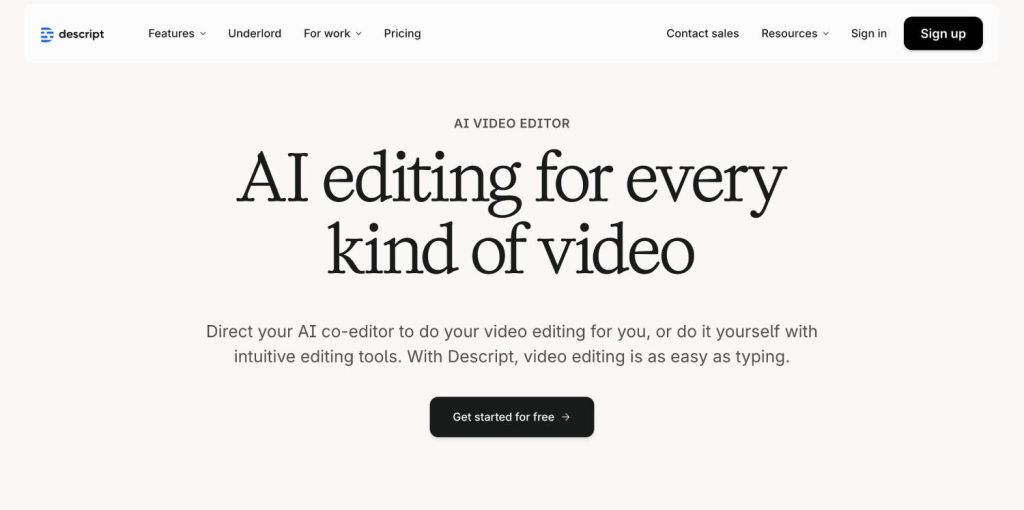
If you’ve used Descript before, you know it sits between a classic editor like Premiere and an AI productivity tool. It’s designed for teams that work with multimedia content and want to speed up editing by treating transcripts as the main editing surface. Descript has the ability to help creators edit videos in a relatively short span of time compared to conventional editing tools that are complex and cumbersome, with a big learning curve.
How Descript Works (in plain English)
Descript takes an audio or video recording, turns it into a transcript, and then lets you:
- Edit the transcript to edit the video.
- Delete text to delete footage.
- Rearrange paragraphs to rearrange clips.
- Replace sentences using AI voice cloning.
- Remove filler words and background noise.
- Use multitrack editing if you want full control.
It dramatically speeds up the editing process and removes the complexity of traditional NLE tools. For creators and marketers, it’s a step-change improvement.
What Descript Is Primarily Designed For
Descript shines in scenarios like:
- Editing podcasts and interview-based content.
- Producing YouTube videos with talking heads or screen recordings.
- Repurposing webinars and long-form content into short clips.
- Creating high-quality marketing videos that still require editing.
- Making demo videos, walkthroughs, or product announcements.
- It gives editors the ability to work relatively fast while still maintaining a professional level of polish.
Why Descript Struggles for Training, Onboarding, and SOP Video Creation
Document-heavy teams run into friction when trying to use Descript for training videos because Descript:
- Doesn’t accept documents as inputs. Sure, one can input paragraphs and short content to create AI-generated videos. However, it is not as intuitive and interactive as one would expect for content related to topics like training and onboarding, to name a few.
- Needs someone to script or narrate content from scratch..
- Depends on human editing judgment for pacing, clarity, and transitions. While this is a big positive for creators and marketing teams alike, time-sensitive departments like HR and Operations cannot afford to spend a sizable amount of time on creating and editing content.
- Videos cannot be integrated with interactive elements like quizzes, chatbots, or Creates static videos that lack quizzes, chat, or interactive elements.
For L&D, HR, and Enablement teams, this creates a scalability problem. You may manage 50–200 documents across onboarding, compliance, product changes, support workflows, or SOP updates. Editing videos manually for each one is simply not feasible.
This frustration is exactly why search queries like:
- “Descript alternative for training teams”
- “AI video from PDF”
- “SOP to training video generator”
- “AI onboarding video generator”
have increased.
What Is Docustream and How It Compares to Descript?
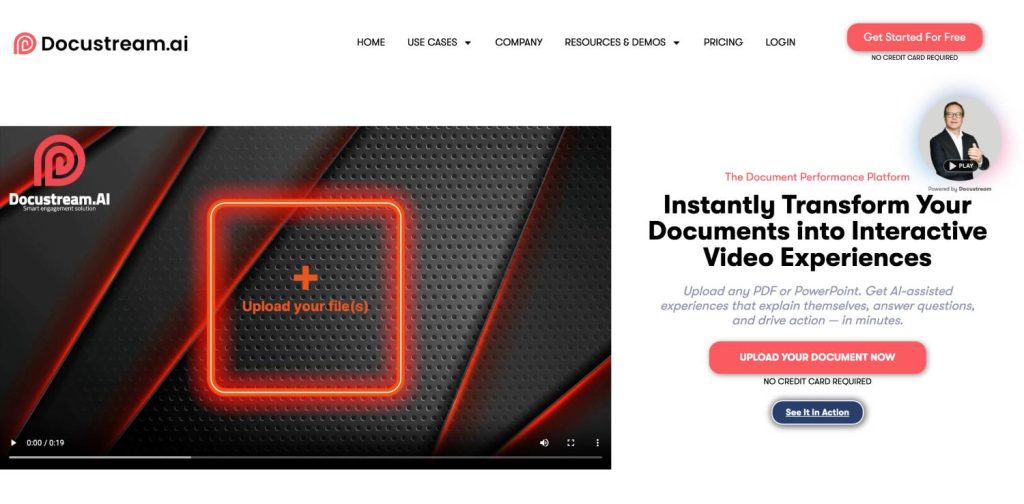
Most training, onboarding, and compliance content doesn’t start with a camera. It starts with documents someone spent weeks assembling: PDF handbooks, SOPs, policy binders, slide decks, client onboarding packs, and internal processes scattered across Google Drive. Docustream exists to transform this content into interactive, engaging, video-led experiences without asking your team to become video editors.
Docustream is not a video editor, not a transcription tool, and not a generic AI assistant. It’s an AI-first document-to-video platform designed for business teams that own documentation and outcomes but do not own editing skills.
Its purpose is simple: Turn any static document into a self-explaining, interactive training experience with narration, quizzes, chat, and analytics.
Where Descript optimizes for creative control and editing precision, Docustream optimizes for comprehension, engagement, and repeatability across training-heavy workflows. It is built for scale, especially when your organization updates policies or product details frequently.
How Docustream Works
Here’s what the workflow looks like when a real team uses Docustream:
1. Upload your document
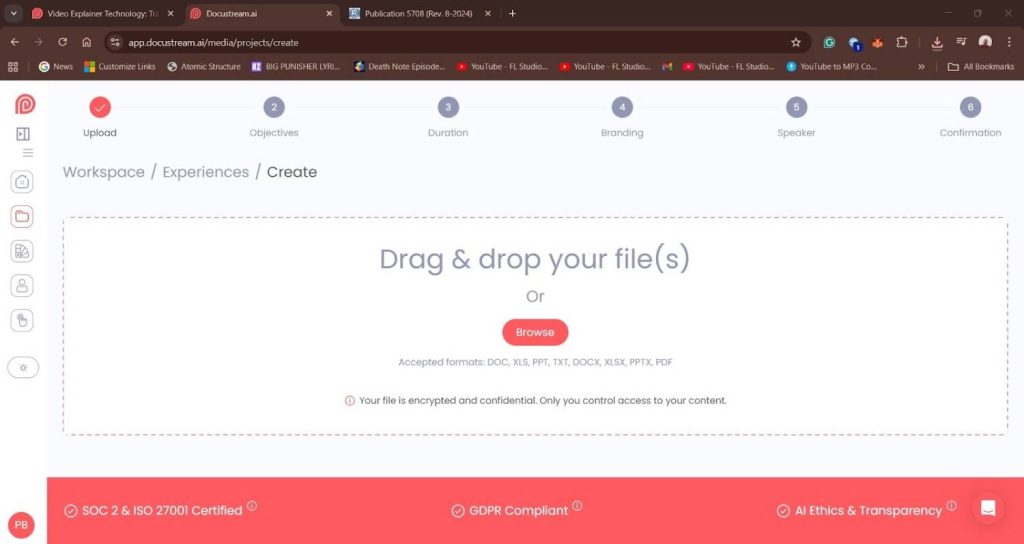
This could be a PDF, PPTX, SOP, policy doc, employee handbook, sales deck, onboarding pack, or long-form client deliverable.
2. Docustream reads, analyzes, and structures the content
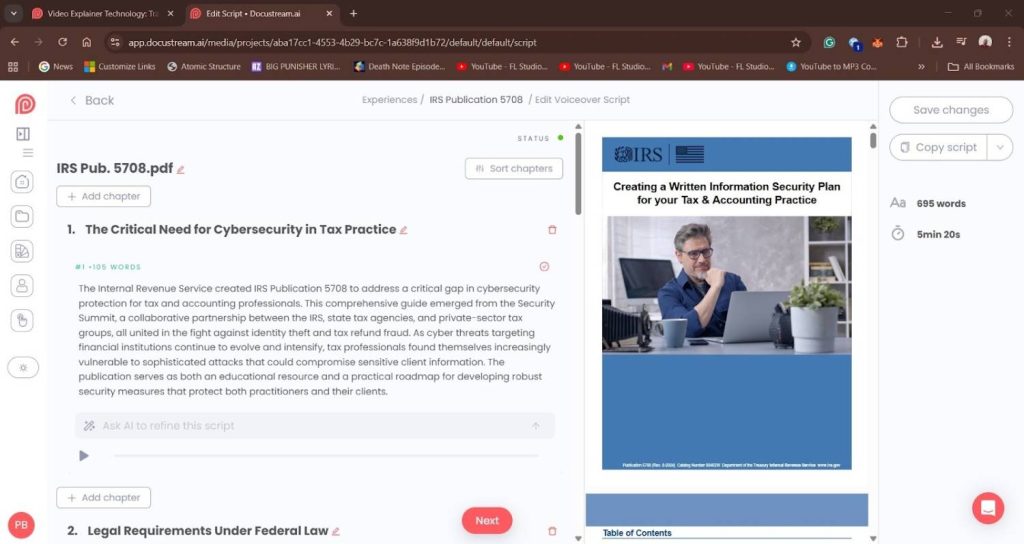
It automatically breaks the material into clean, logical chapters and sections. This structure becomes the backbone of the video and the interactive journey.
3. AI generates the training video
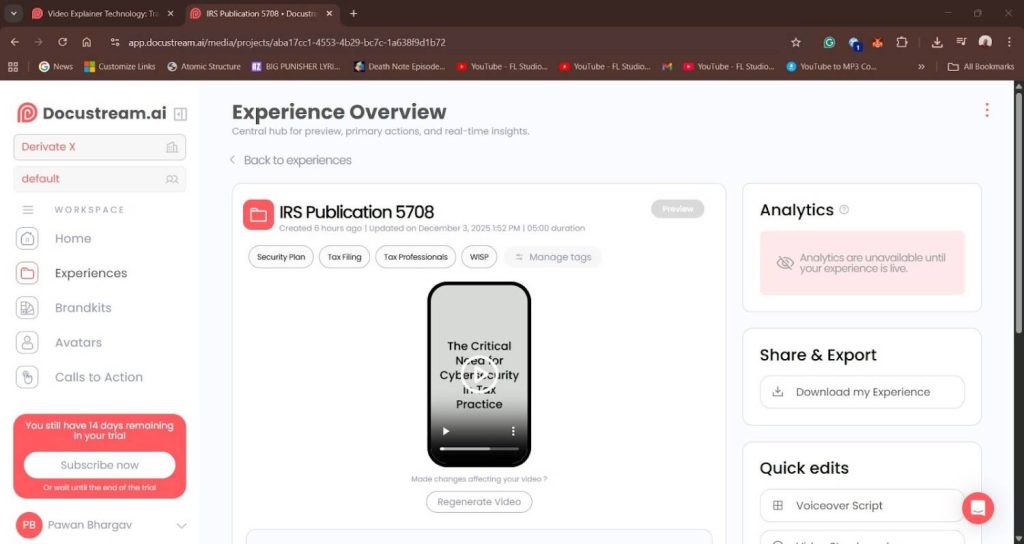
You get:
- Narrated explainers using natural AI voice
- Optional AI avatars when you need a “presenter” feel
- Slide-style visual segments derived from the original document
- Automatic pacing and clear on-screen text
- Clickable chapters for fast navigation
4. Interactivity is added automatically
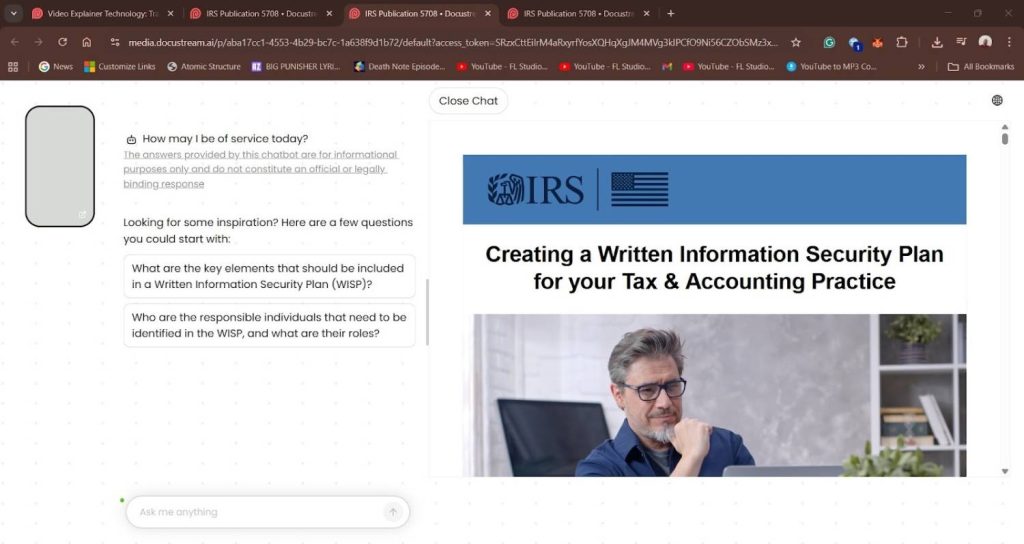
Docustream infuses your training content with:
- Quizzes and knowledge checks
- Inline questions
- Interactive callouts
- Branching or optional deep-dive sections
- AI chat tied directly to your document
This means viewers can ask questions like “Do contractors follow the same PTO rules?” or “What’s the protocol if the client is overseas?” and get answers from the source material.
5. Publish or share instantly
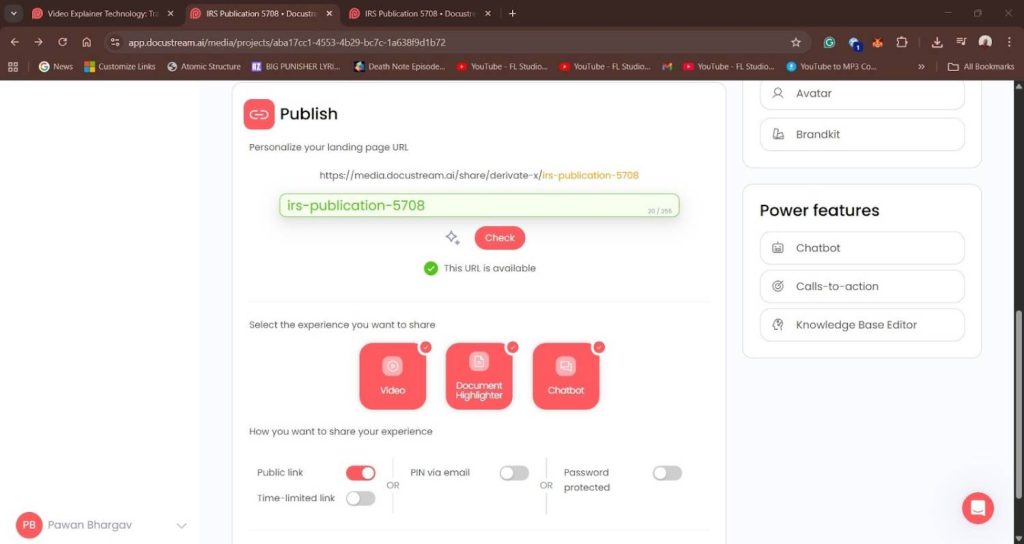
You get a link you can share internally or embed in an LMS, onboarding flow, intranet, or customer portal.
6. Track results with analytics
See:
- Who watched
- What they clicked
- Where they dropped off
- Common questions asked
- Completion rates across training paths
In other words, Docustream handles everything from script to structure to delivery, letting you spend time evaluating comprehension rather than building content.
Why Docustream Exists (and Why Teams Are Adopting It Quickly)
Most HR and L&D teams don’t struggle with “lack of video ideas.” They struggle with time, bandwidth, and skillset misalignment.
Here’s the usual dynamic before Docustream enters the picture:
- Policies change and the training video becomes outdated.
- Someone suggests re-recording.
- No one has the time.
- The team keeps using an outdated PDF or outdated video.
- Compliance or onboarding quality starts slipping.
Docustream removes that entire cycle. Update the PDF or policy doc, re-upload, and you instantly get a refreshed interactive training experience.
A Company Using Descript Struggling With Updates
An L&D manager at a mid-market SaaS company tried using Descript to convert their onboarding PDF into a polished training video. It looked great the first time, but a month later HR updated three policies, IT changed two access procedures, and the Legal team added new compliance wording.
The video was instantly outdated. To fix it, the manager had to rewrite parts of the script, re-record narration, re-edit multiple segments, and re-export the entire file. By the time the updated video was ready, yet another policy had changed.
After two cycles of this, the team quietly went back to sharing static PDFs because maintaining a video felt harder than creating one. The problem wasn’t Descript. The problem was using an editing tool for content that changes too often to justify manual production.
A Team Switching to Docustream and Saving Time
A Customer Success team supporting enterprise accounts decided to try Docustream with their 40-page onboarding guide. They uploaded the existing PDF, and within minutes Docustream generated a narrated walkthrough with chapters, quizzes, and an AI chat that answered common setup questions.
When product updates rolled out, they simply uploaded the revised document and regenerated the module instead of re-recording anything. Client onboarding time dropped because customers could follow the interactive guide at their own pace and ask questions directly inside the experience.
The CS team reclaimed hours they used to spend on repetitive kickoff calls and follow-up clarifications. The win wasn’t just speed. It was sustainability — they finally had a training asset that stayed aligned with their evolving documentation.
This is why Docustream fits into the category we can describe as:
Enterprise-ready document-to-video automation for training-heavy teams.
It’s not for creators. It’s not for marketers. It’s specifically built for the people responsible for clarity, consistency, and compliance.
Use Cases Where Docustream Is a Perfect Fit
Docustream shines anywhere the source content already exists in document form:
1. Employee onboarding
Turn a 70-page employee handbook into an interactive onboarding journey that includes narrated video segments, quizzes, and an AI chat assistant.
2. SOP and process training
Convert step-by-step SOPs into dynamic training where each procedure is broken into narratable segments with visual callouts.
3. Compliance training
Produce AI compliance training videos that show whether each employee actually understood the content, thanks to quizzes and analytics.
4. Product training for Customer Success
When product updates go out, turn change logs and documentation into interactive tutorials without extra recording.
5. Client onboarding
Replace a 30-page onboarding packet with a guided, trackable experience that clients can actually finish.
6. Sales enablement
Turn a sales deck or proposal into an interactive explainer that prospects can navigate on their own.
For each of these, Descript could help if you were starting with footage. But teams in these scenarios aren’t starting with footage. They’re starting with documents.
Docustream starts there too.
Docustream vs Descript – Feature-by-Feature Comparison
The table below covers the complete Docustream vs. Descript comparison for training, onboarding, and document-heavy workflows:
| Feature / Criteria | Docustream | Descript |
|---|---|---|
| Primary Input | Documents: PDFs, PowerPoints, SOPs, handbooks, policies | Media: Video recordings, audio files, screen captures |
| Primary Output | Interactive training experiences with video, quizzes, chat, and analytics | Edited videos, podcasts, clips, social media content |
| Editing Model | No-edit or minimal-edit AI automation | Text-based editing plus timeline-based editing |
| Ideal For | Training, onboarding, compliance, SOP training, internal enablement | YouTube videos, podcasts, marketing clips, demos, interviews |
| Interactivity | Built-in quizzes, chapters, branching, and AI chat | None; outputs are static videos |
| Update Workflow | Replace the updated PDF; regenerate | Re-record footage; re-edit timeline |
| Org Owner | HR, L&D, CS, Ops, RevOps, Sales Enablement | Marketing, creators, media and content teams |
| Analytics | Engagement analytics, drop-off points, quiz results, question logs | Basic playback analytics (external, not native) |
| Learning Curve | Extremely low, no editing required | Moderate; requires understanding editing or transcript workflows |
| Time to Produce | Minutes | Hours to days depending on revisions |
| Scalability Across Dozens of Docs | Very high; batch-friendly | Low; every video requires manual editing |
Pricing and ROI – Docustream vs Descript
Both Docustream and Descript deliver value, but they do so in fundamentally different ways. Descript saves time for creators who already work with footage. Docustream saves time for teams who never wanted to produce footage in the first place. That difference shapes everything about cost, effort, and long-term ROI.
How to Understand Descript’s Pricing for Training Use Cases
Descript’s pricing is built around:
- per-seat licenses
- usage or export limits
- AI credit consumption
- transcription and overdub quotas
For creative teams, this model makes sense. They know how to budget recording and editing hours. For HR, L&D, or Ops teams, the real cost isn’t the subscription. The cost is the time it takes to create and maintain edited videos.
When training content changes, your costs increase because someone must:
- rewrite a script
- record new narration
- edit or re-edit the timeline
- polish transitions
- reexport, reupload, and redistribute the video
Even if you use Descript’s overdub voice, someone still manages the editing project. That becomes expensive the moment you scale beyond a handful of videos.
How to Understand Docustream’s Pricing for Training and Enablement
Docustream’s pricing is built around the needs of training, compliance, onboarding, and client education teams. The platform is structured so organizations can convert large volumes of written content into training-ready interactive experiences without increasing staffing or editing capacity.
Docustream’s value model focuses on:
- reducing manual content creation time
- enabling non-technical teams to publish training without video editors
- allowing instant updates when documents change
- providing analytics that improve training effectiveness
- supporting engagement-heavy workflows like onboarding and compliance
The ROI is not tied to how many minutes of footage you produce. It’s tied to how much documentation you convert into something people actually understand and finish.
For more detail, readers can explore Docustream pricing, but the bigger picture is clear: the platform is priced for teams that produce and maintain dozens to hundreds of internal training assets, not a small number of creative videos.
ROI Comparison: What Actually Changes for Your Team
Here is the real breakdown organizations experience when switching to Docustream for document-driven training content.
1. Time Savings
- Docustream takes minutes to generate a training module.
- Descript takes hours to produce and refine a video.
- Time saved becomes exponential when dealing with multiple documents.
2. Update Costs
- With Docustream, updating a policy or SOP is as simple as uploading a revised file.
- With Descript, you need new narration, new edits, and usually a complete rebuild.
3. Training Quality
Docustream improves comprehension through:
- Narration
- Segmentation
- Interactivity
- Quizzes
- AI chatbot
- Analytics
Descript produces high-quality static videos, but the viewer has no way to ask questions or confirm understanding.
4. Support and Ticket Reduction
When onboarding or product training is delivered through Docustream, learners ask fewer questions because the content already answers them. That directly reduces internal and customer-facing support load.
5. Scalability
- Docustream scales across every document-heavy workflow in the organization.
- Descript scales only if you have enough editors, scripts, and recording bandwidth.
Where Descript Still Wins
Descript remains the stronger choice when your workflow is built around recording-first content creation. If your team regularly produces videos that start with a camera, microphone, or screen recorder, Descript offers capabilities Docustream doesn’t attempt to replace.
This includes text-based editing for fast cleanup, timeline control for fine-tuning pacing, and multitrack audio tools that help creators achieve a polished final product.
It’s especially valuable for YouTube channels, podcasts, product demos, interviews, and social clips where creative precision matters. For external-facing assets where visual storytelling, brand polish, or frame-level control are non-negotiable, Descript continues to be the right choice.
Where Docustream Has Limitations
Docustream’s advantage is speed and scale for document-based training content, but it is not a universal video creation tool. It isn’t suited for creative-heavy productions, complex animation workflows, or scenarios where teams want to design videos frame by frame.
Outputs are structured, clarity-focused training experiences rather than cinematic videos. It also isn’t ideal if your source material starts as raw footage, since the platform doesn’t offer timeline editing or detailed manipulation of recorded media.
For teams that need creative flexibility or produce highly stylized content, Docustream should complement — not replace — a traditional editor.
Descript helps you make great videos. Docustream helps your documents produce measurable outcomes.
Realistic Stacks – When Teams Use Both Docustream and Descript
Many organizations do not replace Descript. They reposition it.
| Tool | External-Facing | Internal-Facing |
|---|---|---|
| Descript | Promotional videos | |
| Product demos | ||
| Webinars | ||
| YouTube content | ||
| Customer interviews | ||
| Polished marketing assets | ||
| Docustream | Client onboarding | Onboarding |
| Product education for customers | Compliance training | |
| SOP training | ||
| Internal enablement | ||
| Internal comms | ||
| Process documentation conversions |
Docustream eliminates the editing burden for everything that begins as a document. Descript remains the go-to editor for everything that begins as footage.
Why This Matters for the Comparison
Teams often compare Docustream vs Descript because they assume both are video creation tools. In reality, they sit in different categories:
- Descript competes with timeline editors and creator tools.
- Docustream competes with static documentation, LMS-hosted PDFs, and manual training video production.
Docustream is the alternative to doing training the slow way.
Descript is the alternative to traditional editing tools.
How to Decide in Under 10 Minutes
Here’s the quickest structured framework for choosing between Docustream and Descript.
Step 1: Identify What Your Content Starts As
If it’s documents such as PDFs, PowerPoints, SOPs, Handbooks, Notion pages, or client onboarding kits, Docustream is the automatic match.
If it’s recordings like talking-head videos, demos, interviews, podcasts, Descript fits better.
Step 2: Assess Who Will Maintain It
Ask yourself:
- Does HR, L&D, CS, Ops, or RevOps own this content?
These teams don’t want editing software. Docustream fits.
- Do you have editors or creators on staff?
If yes, Descript fits creative workflows.
Step 3: Evaluate Time-to-Value
- Docustream: Upload a document and get an interactive training experience in minutes.
- Descript: Record, edit, refine, export, upload to LMS, and update manually.
If your team is bandwidth-constrained or high-volume, Docustream offers immediate efficiency.
Step 4: Decide Based on Expected Scale
- A few videos per year? Either tool works.
- Dozens of SOPs, onboarding modules, and policy changes? Docustream is built for that.
Final Recommendation
If your goal is to make your documents explain themselves instead of turning HR, L&D, or Ops into accidental video editors, choose Docustream.
For teams that need polished, creator-style content, keep Descript for marketing and media projects. Many teams run both, but only one removes the editing burden entirely.
Who Should NOT Choose Docustream?
Docustream solves a very specific problem: turning static documents into interactive, video-led training experiences without editing. That makes it a powerful fit for HR, L&D, CS, Ops, and compliance teams drowning in PDFs and SOPs. But there are a few scenarios where Docustream is not the right tool — and being clear about these helps avoid misplaced expectations.
You Need Full Creative Control Over Video Production
If your primary output needs are:
- frame-level editing
- cinematic transitions
- precise B-roll placement
- multi-track audio mixing
- detailed visual storytelling
you’ll quickly hit the limits of a document-first workflow. Docustream isn’t meant to replace Adobe Premiere, Final Cut, or Descript for creative teams producing marketing videos or brand-sensitive content. If your videos must look like polished YouTube productions, a traditional editor is a better match.
Your Content Starts as Footage, Not Documents
Docustream is built for documents, not raw media. If you normally work with:
- recorded demos
- interviews
- screencasts
- podcasts
- talking-head videos
uploading those into Docustream won’t give you the editing controls you expect. In that case Descript remains the right tool — because your workflow starts with a microphone or camera rather than a PDF.
You Need Highly Custom Motion Graphics or Complex Animations
Certain training teams, especially in design-heavy organizations want:
- custom motion graphics
- branded kinetic typography
- character animation
- fully bespoke visuals
Docustream focuses on clarity, structure, and interactivity, not animation-heavy storytelling. If the work requires a motion designer, Docustream won’t replace that role.
You’re Producing One-Off Creative Campaigns
If your content needs are occasional and creative (for example, a quarterly brand video, a product launch trailer, or a customer story), Docustream won’t provide the polish required. It excels in repeated, document-based training workflows, not one-off brand assets.
You Don’t Have Document-Based Content to Start With
Docustream’s superpower is tied to the documents you already own. If your organization doesn’t rely heavily on SOPs, policies, playbooks, handbooks, or internal documentation, the value shifts. Some teams operate with minimal written processes, and in those cases, there is less for Docustream to convert.
You Want Static Video Files Instead of Interactive Experiences
If your team prefers traditional video files that they can upload to YouTube, store in an LMS, or distribute as MP4s and you don’t care about interactive layers, a simple editing tool is enough. Docustream’s advantage is the interactivity layer (quizzes, chat, analytics). If you don’t need those, you may not get the full value.
Conclusion: Let Your Documents Do the Explaining
Every organization eventually realizes the same truth: documentation is abundant; time is not. When you ask internal teams to become video editors, you create bottlenecks. When you let documents automatically explain themselves, you unlock scalable training.
Docustream gives HR, L&D, Enablement, CS, Ops, and RevOps a direct path from PDFs to interactive video — with no editing burden, no recording, and no timeline juggling. Descript remains the best choice for creative teams working with footage. Most modern organizations use both, but for very different purposes.
If you want to see how quickly your documents can turn into interactive training, try it today.
If you prefer exploring hands-on, upload and create an interactive video with Docustream’s free trial.
FAQ: Docustream vs Descript for Training, SOPs, and Onboarding
1. Is Docustream a Descript alternative?
Yes, but only for training-oriented use cases. Docustream is an alternative if your input is a document and your output should be an interactive training experience. Descript is still better for editing footage.
2. Who should use Docustream vs Descript?
Use Docustream if you are in HR, L&D, Enablement, CS, Ops, or RevOps and need to turn SOPs, handbooks, policies, or onboarding documents into interactive training. Use Descript if you are a creator, marketer, or product team producing videos from recordings.
3. Can Descript automatically turn PDFs and SOPs into interactive training videos?
No. Descript requires recordings and editing. It cannot convert a PDF into a narrated training video with quizzes or chat.
4. Do I still need a video editor if I use Docustream?
For internal training, onboarding, compliance, or SOP videos, typically no. For public-facing promotional videos, product launches, or YouTube content, you may still want Descript.
5. Is Docustream better than Descript for onboarding and training?
Yes. For document-heavy training content, Docustream is purpose-built and significantly faster. Descript is not optimized for onboarding workflows or policy-driven content.
6. Is Docustream only for large enterprises?
No. While it is enterprise-ready, it’s used by mid-market SaaS teams, accelerators, consultancies, and fast-growth companies with heavy documentation needs.
7. Can I try Docustream for free?
Yes. You can create an account and upload one of your training PDFs to see it transformed into an interactive video. No credit card required.